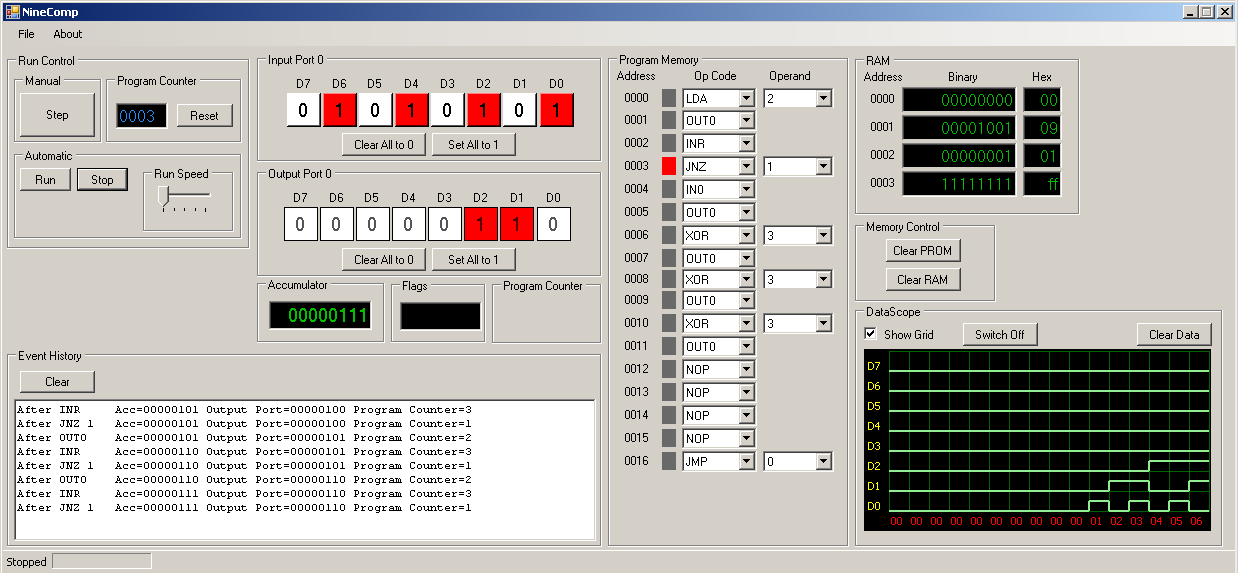
To assist some students in their understanding of simple microprocessors, programming and binary I put this simulator together.
If you think it would be useful for your demonstrations or teaching drop me an email.
(theres a short video here )
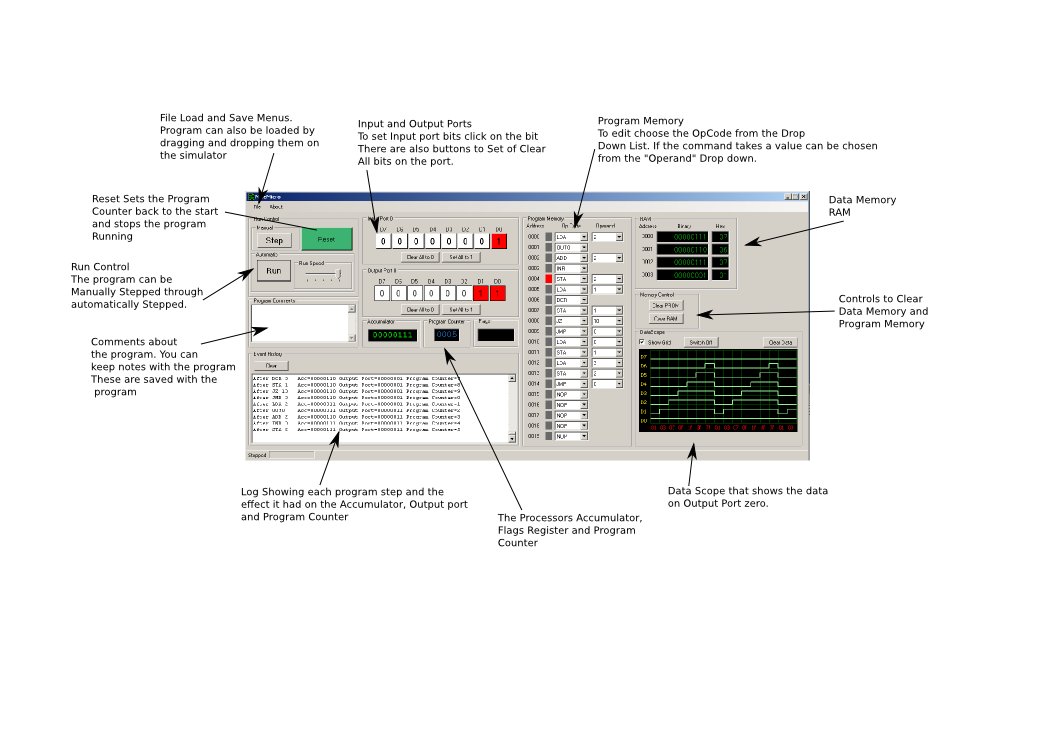

To assist some students in their understanding of simple microprocessors, programming and binary I put this simulator together.
If you think it would be useful for your demonstrations or teaching drop me an email.
(theres a short video here )
These notes are for use when it is required that a device automatically starts, runs an x-session and then runs a particular task.
For example an information display. In those situations it may also be required that the screen does not blank.
Auto Login
Notes from http://elinux.org/RPi_Debian_Auto_Login
sudo nano /etc/rc.local
su whateverusername -c startx
Stop the screen saver
Notes from http://raspberrypi.stackexchange.com/questions/752/how-do-i-prevent-the-screen-from-going-blank
install xset apt-get install x11-xserver-utils
open or create ~/.xinitrc
xset s off # don't activate screensaver
xset -dpms # disable DPMS (Energy Star) features.
xset s noblank # don't blank the video device

exec /etc/alternatives/x-session-manager # start lxde
Auto run
Notes from http://blog.flowbuzz.com/2012/07/raspberry-pi-and-autostart.html
cd ~/.config
mkdir autostart
then creat file called .desktop
format of contents is
[Desktop Entry]
Type=Application
Exec=/filetorun
Recently I have been using an mbed micro-controllers. These are a great way to rapidly prototype micro-controller projects. One of the great features of the boards is that they provide a serial-over-usb port that can be used to communicate with the board.
The boards have a good range of on-board peripherals (a:d d:a,pwm,rtc, counters), and can read/write to usb, connect to ethernet.
One of the problems I encounter when moving to new dev tools and micro-controllers is the lack of on-board debugging. An alternative can be to hook something up to a serial port so that you can “talk” to your board, read values from variables and ports.
When working on a new project I like to have the command shell available on the device as well as the program I am working on.
http://mbed.org/users/jont/code/JonsDebugTerminal/ uses the serial over usb port and provides a very simple command “shell”. It can be extended to support the functions you need. As it is, it allows setting of the real time clock, interrogation the A:D converters and the control a few port lines on.
The code is not robust, or neat, or K&R, 🙂 the code has a *lot* of scope for improvement. Its old code I wrote in the 90’s for another micro.
But its good enough to allow you to play with the board and can be help when developing a new project.
Quick fix information. Using NoMachine NX with Linux Mint. The full steps were found at this blog http://www.fbunix.com/blog/archives/178
in short….
edit /usr/NX/etc/node.cfg
and make the gnome-session line
CommandStartGnome = “/etc/X11/Xsession mate-session”
[a quick reminder dont expect all the detail here…just clues]
How to make your JAVA application work behind a proxy.
This assume proxy is called webcache.ninelocks.com and is on port 8080 and the jar file we want to run is called PHRss.jar
java -Dhttp.proxyHost=webcache.ninelocks.com -Dhttp.proxyPort=8080 -jar PHRss.jar
Copious ORacle style notes on this available at
http://docs.oracle.com/javase/6/docs/technotes/guides/net/proxies.html
For the ph_lyrics project the tweets occur at random intervals of time. But it was desired that the chosen interval should be more likely to be a longer rather than shorter interval. What was needed was a php mechanism for generating weighted random numbers.
As ever the folks over at stackoverflow had the answer.
Which looks like this:
function weightedrand($min, $max, $gamma) {
$offset= $max-$min+1;
return floor($min+pow(lcg_value(), $gamma)*$offset);
}
Problem encountered was with the mind mapping application Freeplane, it would not print on a 64 bit version of Mint LMDE.
The printers were listed in the print dialog but there was no output.
Running Freeplane from a terminal showed errors relating to gnome keyring. the fixes and workround for that are described here
Tests with simple java exhibited the same problem. But no sign of any error messages.
Final solution was found here at the howto forge. In short install cups-bsd.
When using my favourite(lol) language I forget the fixes for dealing with multiple versionssudo update-alternatives --config javasudo update-alternatives --config javacsudo update-alternativesWhy you may need these is illustrated here
The webpage that is the home for the ph_lyrics project provides an RSS feed to offer random songlines and this has provided a useful testbed for an RSS reader required as part of another project.
But as its written I thought I would leave it onsite …just in case anyone should you feel a need for desktop feed of songlines.
It should (being JAVA…ROFL) work on multiple platforms, the reality may be different.
Whilst some things do what they say on the tin, the same does not alway apply for a JAR…….(gets coat)
A few weeks ago I wrote an application than randomly tweets lyrics by Peter Hammill the twitter account is @ph_lyrics and there is a website at www.ninelocks.com/ph_lyrics
During the testing phase the application sent a random songline every 3 hours which was too often and too regular, so the mechanism has been changed.
This is currently undergoing some testing and should go live in the next few days. With the new version there should now be no more than 1 tweet per day and that will occur at a random time throughout the day.
For those interested in the logic….
The main script is called by a cron job every 10 minutes.
If it has been > 24 hours since the last tweet there is a 1 in 10 chance a tweet will be sent.