The Mindmap Desktop and an XMind quirk

The mindmap and is often considered as a tool for organising ideas {ref} but I find them a useful way of organising projects and tools I frequently work on. Linking the nodes to the documents you are working on or the applications you need to do your work can provide a very quick way to access them.
When I was a Windows user I used MindManager, but now I am on Linux I use FreePlane(a variation of Freemind) and XMind.

But using Linux Mint 13 (64Bit version) i have found that some document types do not open correctly as linked documents. I found this link describing a similar problem with KDE.

So as source is available I set about getting a working developement environment to look at the problem and modify the source. As it happens once I had the dev system setup and built the existing version of Xmind I didnt need to make any changes but the process of getting the application to compile and all the relevent parts of Eclipse working did prove to be a challenge, and one I dont want to repeat, so  over the next few posts there will be a few about configuring the build tools that others may find useful.

I will also describe how I setup my mind-map desktop and the additional scripts that were needed to work round features of the mindmap software….


Meantime an idea of what one of my mindmap desktops looks like
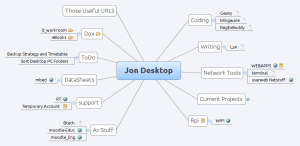
Jon Desktop

A click can take me to a folder of files I want to look at, an application I want to launch, a web link or  open an ssh session to a remote machine

Posted in computing, linux, mindmaps | Comments Off on The Mindmap Desktop and an XMind quirk

Combining Wake-on-lan and Opening a Terminal

Combining Wake-on-lan and Opening a Terminal to a remote system

In my continuing quest to automate repetitive system tasks I have combined Wake-On-Lan with my remote-console command.
I have a remote machine that I remotely startup using  wake-on-lan. And this is something I use most days. I ususally connect to the system via an ssh session. My shortcut to the terminal is now linked to a script that checks if the system is awake, and if notsends the wol commands and wait untill it can see the system then finally launches the terminal.

The terminal has a differant profile to remind me it is a remote session.(to try to stop me rebooting the wrong system)

The script IS a bit hack and it could be greatly improved. If you try and use it there are a few extras you may need to install. (fping wake-on-lan and on some system zenity)

#!/bin/bash
#jont@ninelocks dogs dinner script, nasty but it works...
#need to add incheck for if terminal connected or something....
#130612 should really add check for fping being installed
#below wakehost calls a wakeonlan script for the host
#blah is the name of a terminal profile
host="192.168.1.99"
COUNT=0
alive=0
fping -u $host >& /dev/null
if [ $? -ne 0 ]; then
		(while [ $COUNT -lt 100 ]; do
			echo $COUNT
			let COUNT=COUNT+5
			wakehost.sh
			sleep 20
			fping -u $host >& /dev/null
			if [ $? = 0 ]; then
				$alive=0
				break;
			fi

			done ) | zenity --progress --auto-close
fi
if [ $alive = 0 ]; then
#gnome-terminal --window-with-profile=blah
mate-terminal --window-with-profile=blah -e "ssh host"
fi

class HelloWorld {    public static void main(String[] args) { System.out.println("Hello World!");    } }

zenity to provide the dialog box, fping to provide a ping service thats script friendly.

The terminal line will vary depending on your system. The one shown was for a mint based system…. and yes it could be greatly improved, but it works enough to do what I need at the moment, ymmv 🙂

Posted in computing, linux | Tagged | Comments Off on Combining Wake-on-lan and Opening a Terminal

Horizontal Scroll Problem In FreePlane and other JAVA applications

A problem has shown up with JAVA applications when there is a horizontal scroll bar. When scrolling the window content is scrambled. Fortunately there is a fix as described here

https://bugs.launchpad.net/ubuntu/+source/nvidia-graphics-drivers/+bug/876721

And thanks to the info in this post

starting many applications with -Dsun.java2d.opengl=True seems to fix the problem. However freeplane has a startup script that does the actual launching so you have to modify that script.

For FreePlane the launch script is found in /usr/share/freeplane. (called freeplane.sh)
The alterations I made are towards the end of the file , snippet below, my additions are on lines 3, 18 and 32 (not what is shown below is just a section of the file, around line 189 onwards..cheers Julien)

#--------- Call (at last) Freeplane -------------------------------------
fwdir="${freedir}/fwdir"
jon=-Dsun.java2d.opengl=True
if [ "${JAVA_TYPE}" != "sun" ]
then # non-Sun environments don't work currently but we try anyway, who knows.
	defines=-Dgnu.java.awt.peer.gtk.Graphics=Graphics2D
fi
_debug "Calling: "\
"${JAVA_CMD}" -Xmx512m\
 "-Dorg.freeplane.param1=$1"\
 "-Dorg.freeplane.param2=$2"\
 "-Dorg.freeplane.param3=$3"\
 "-Dorg.freeplane.param4=$4"\
 "-Dorg.knopflerfish.framework.bundlestorage=memory"\
 "-Dorg.freeplane.globalresourcedir=${freedir}/resources"\
 "-Dorg.knopflerfish.gosg.jars=reference:file:${freedir}/core/"\
 $defines\
 $jon \
 -jar "${freedir}/framework.jar"\
 -xargs "${freedir}/props.xargs"\
 -xargs "${freedir}/init.xargs"
( echo "${DEBUG}" | grep -qe "exit" ) && exit 0 # do not start Freeplane
"${JAVA_CMD}" -Xmx512m\
 "-Dorg.freeplane.param1=$1"\
 "-Dorg.freeplane.param2=$2"\
 "-Dorg.freeplane.param3=$3"\
 "-Dorg.freeplane.param4=$4"\
 "-Dorg.knopflerfish.framework.bundlestorage=memory"\
 "-Dorg.freeplane.globalresourcedir=${freedir}/resources"\
 "-Dorg.knopflerfish.gosg.jars=reference:file:${freedir}/core/"\
 $defines\
 $jon \
 -jar "${freedir}/framework.jar"\
 -xargs "${freedir}/props.xargs"\
 -xargs "${freedir}/init.xargs"
Posted in computing, linux, mindmaps | Tagged , , | Comments Off on Horizontal Scroll Problem In FreePlane and other JAVA applications

A Mindmap as the Desktop and Unblocking VUE

I use the Tufts University application VUE  the Visual Understanding Environment both as a pseudo mind map tool and as a way of organising my ‘desktop’.

I find using MindMap and Concept map applications a handy way of quickly getting to the files and applications I need (I currently use Freeplan and XMind as well)

For my purpose these tools be able need to be able to launch other applications as that allows me to click on a node of the map to open a document or suitable application for something I am working on. For example if debugging a network problem I may want to launch Wireshark, so I would then click on the relevant node in my map to launch wireshark

But I had a problem with VUE,  if the application launched is not already running then VUE ‘blocks’ and you cannot do anything else within VUE until the launched application is exited.

Fortunately as the source is available it meant it was possible to find why this was happening and fix it. VUE is written in  JAVA. (an  added the complication that I had just reinstalled Linux and had not got the JAVA tools installed, so that diverted my attention for a while).

While the JAVA tools were installing  I set to finding out what was happening. I detail this, not because its especially new or exciting, but you may have a similar project and so by recounting what I did it may help you do the same.

To find out what was going on I first launched VUE  from within a terminal so I could see the any messages. (This is always a handy starting point for debugging in Linux )

This showed that it was using gnome-launch to call external applications. Next was to find where in the code this was used.

I went for a brute for approach of grepping all the source folders.

</pre>
grep gnome * -r
<pre>

Which showed that the gnome-action takes place in Util.java. To narrow down where it was hanging I added some extra debug messages to the source and modified some of the existing ones to narrow down where the hang was happening.

The problem was the while statement at line 10. As nothing seems to be done with the data read into line, it seemed safe to comment out the statements. The modified code is shown below.

</pre>
Log.info("gnome-open " + url);
 process = runtime.exec(new String[] {"gnome-open" , url});
 // out("process: " + process);
 InputStream stdin = process.getErrorStream();
 InputStreamReader isr = new InputStreamReader(stdin);
 BufferedReader br = new BufferedReader(isr);
 String line = null;
 System.out.println("<OUTPUTa>");
 //while ((line = br.readLine()) != null)
 // System.out.println(line);

 System.out.println("<OUTPUTb>");</pre>

Final thoughts… VUE also hooks in to using http://www.opencalais.com/ to provide semantic analysis of resources. (if you are  not sure what that is, go and take a look…its worth it ).

Posted in computing, linux, mindmaps | Tagged , , , , , , | Comments Off on A Mindmap as the Desktop and Unblocking VUE